In electronic music production, one subject generates plenty of debate and sometimes a certain obsession among producers: the phase relationship between kick and bass.
We all want a powerful, defined and balanced low end. We want our kick to punch through and have its own space in the mix, while the bass adds body and both work together, especially when our music is played on powerful sound systems.
However, we sometimes encounter a familiar problem: we have a fantastic-sounding kick and a bass that works perfectly on its own, but something seems wrong when we play them together.
The mix loses power, the low end becomes inconsistent, or we simply cannot achieve the solid feel we are looking for.
One possible cause is the phase relationship between the two sounds.
Although it may seem complicated, understanding the basics and learning to identify the most common problems is easier than it sounds.
I want to start by sharing something from my own experience.
For Years, I Barely Paid Attention to Phase
I have to admit that, for much of my career as a producer, I did not pay much attention to the phase relationship between kick and bass.
Not because I was unaware of it, but because I had always considered it one of the more technical aspects of music production.
The idea of analysing waveforms, calculating timing offsets and studying how frequencies interact seemed quite far removed from the creative side I really enjoy.
I have always been a fairly pragmatic producer.
I like to work quickly, trust my ears and spend most of my time composing and developing musical ideas.
For years, my approach to kick and bass was therefore quite simple.
If they sounded good together, I moved on. If I could not get the result I wanted, I tried another kick, changed the bass or adjusted its processing.
In reality, I was solving many of these problems intuitively.
Even without visually analysing phase, my ears were already telling me when two sounds worked together and when they did not.
That ability develops over time. You learn to recognise more quickly when a bass has too much sub, when a kick needs a shorter tail, or when both sounds are competing for the same space.
Recently, I have started paying more attention to phase and using dedicated tools to analyse it.
I have discovered something interesting: we do not need to become audio engineering experts to start improving this aspect of our productions.
What Is Phase in Music Production?
An audio signal can be represented by a waveform showing how its amplitude changes over time.
For a periodic wave, phase describes where it is within its cycle.
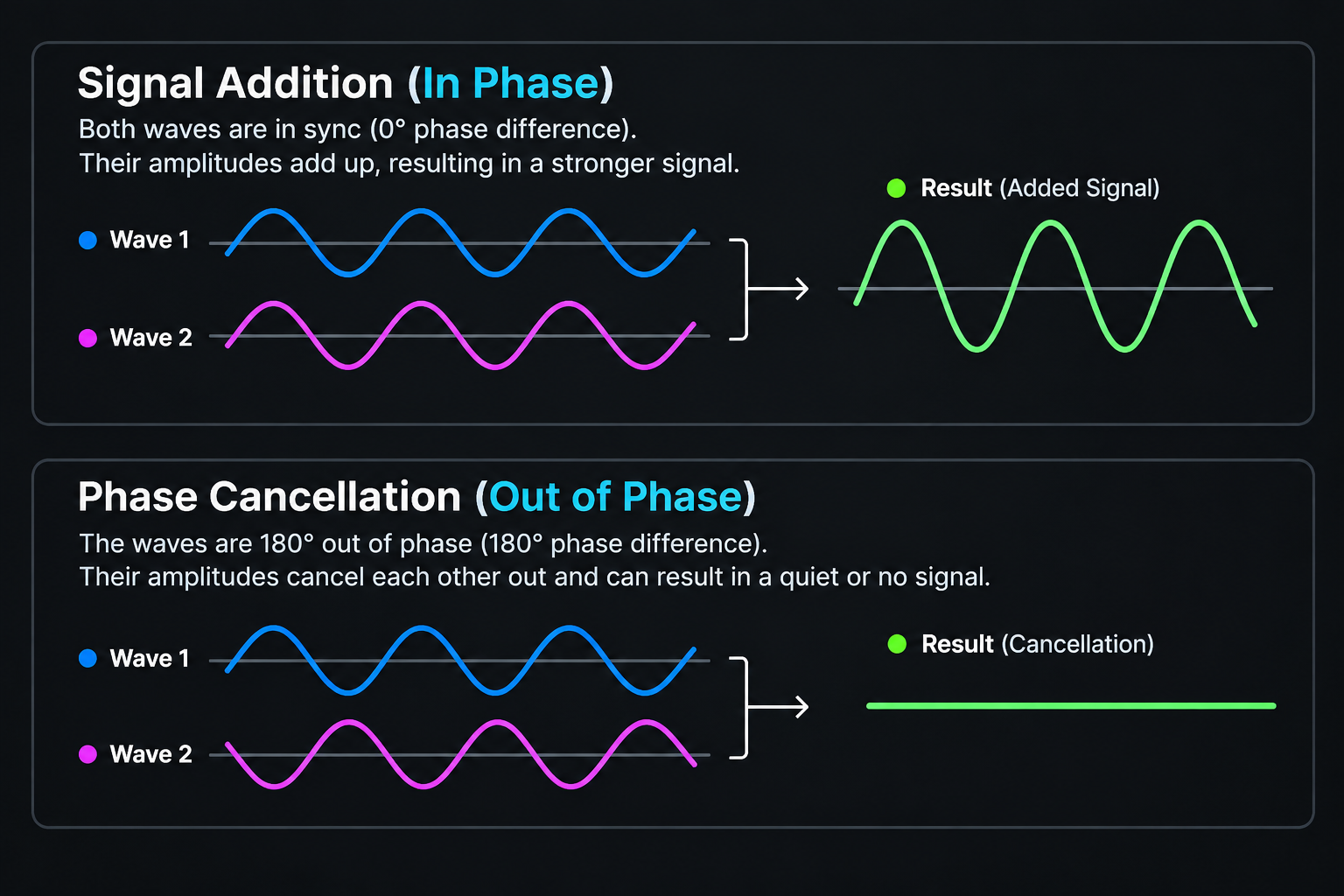
Imagine two sine waves with the same frequency.
If their positive and negative movements line up, their amplitudes add together, producing a signal with greater amplitude.
If one wave is positive while the other is negative, they can partially counteract each other.
In the extreme case of two identical waves with equal amplitude and a phase difference of 180 degrees, they can cancel completely.
This is known as phase cancellation.
However, real sounds are rarely perfect sine waves.
A kick contains an initial transient, different frequency components and, usually, a pitch that drops as the sound develops.
A bass can contain a fundamental frequency and numerous harmonics. Its notes may also change constantly.
Perfectly aligning both sounds throughout an entire track is therefore usually neither possible nor necessary.
What we want is to improve their interaction, particularly in the low frequencies and at the moments when they overlap.
Why Does Kick and Bass Phase Matter?
In genres such as Trance, Progressive House, Techno and many others, kick and bass are two of the most important elements of the production.
Both can contain considerable energy in the low frequencies.
When they overlap in time, their waveforms add together.
Depending on their phase relationship, certain frequencies can reinforce or partially cancel each other.
The result may be a more powerful low end or, conversely, a loss of energy in certain parts of the spectrum.
This also explains why a bass sometimes seems to lose power when the kick comes in, even though both sound perfectly good on their own.
It is not just a club sound system issue.
Cancellation can occur on any playback system. However, on systems capable of reproducing powerful sub frequencies, the differences can be particularly noticeable.
We should also remember that not every low-end problem is a phase problem.
A kick that is too long, a bass with excessive sub energy, poorly adjusted sidechain settings or unsuitable sound selection can produce similar results.
Before adjusting phase, we need to identify what is actually happening.
Choosing the Right Kick and Bass Still Comes First
This is something I consider particularly important.
For many years, I achieved good results simply by choosing sounds that worked well together.
I still believe this is one of the most important decisions we can make as producers.
A good kick and bass should complement each other.
If the kick has a very long tail that occupies much of the available sub-bass space, introducing a powerful bass will probably be more difficult.
Similarly, a bass with too much energy in the same frequencies as the kick can create an excessive build-up of low end.
Before reaching for alignment tools, check whether another kick, a shorter kick tail or a different bass envelope improves the result.
We can also use volume sidechain to temporarily reduce the bass level when the kick hits.
This does not directly align their phases, but it reduces overlap and can solve many practical problems.
We do not always need a complicated solution to get a good result.
How to Check for Phase Problems
One of the simplest starting points is listening to the kick and bass together and comparing that with their individual sounds.
First, listen to the kick.
Then, listen to the bass.
Finally, play both together.
Does the result have the body and punch you expected? Or do certain frequencies seem to lose power when the two sounds overlap?
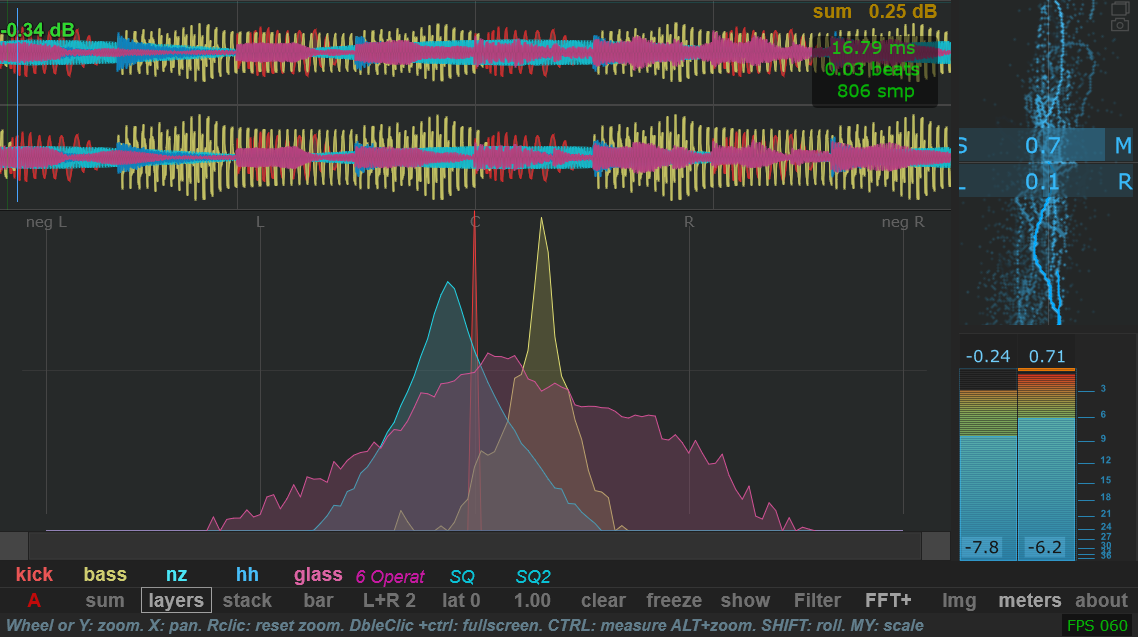
A visual tool such as an oscilloscope can help you understand what is happening.
Oscilloscopes let us observe waveforms and compare their behaviour over time.
Zooming in sufficiently can reveal how the low-frequency cycles of the kick and bass relate to each other.
However, we should not obsess over making every peak and trough line up perfectly.
We are working with complex sounds, not two identical sine waves.
What matters is whether the adjustments actually improve what we hear.
How to Improve Phase Manually
There are several ways to change the phase relationship between kick and bass.
The first is to invert the polarity of one sound.
Polarity inversion changes the sign of the signal: positive values become negative and vice versa.
For a sine wave, this is equivalent to a 180-degree inversion, but it does not provide intermediate phase adjustments.
It is a quick test that can be useful in certain situations.
Another option is to shift one of the sounds slightly in time.
For example, we can delay the bass by a few samples and listen to how its interaction with the kick changes.
Even very small timing offsets can significantly alter the sum of certain low frequencies.
We can also use tools that change phase without shifting the entire sound in time, such as all-pass filters.
These processors alter the phase relationship of different frequencies without directly changing their levels.
However, always evaluate any adjustment in context. A timing offset that improves one bass note may not work equally well for another.
Adjusting Phase in Ableton Live
Ableton Live provides several tools for addressing these issues.
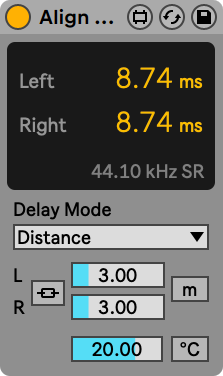
One of the simplest is Align Delay, available as a Max for Live device in Live 12 Suite.
It can delay a signal in milliseconds or samples, making it useful for small timing adjustments.
Insert it on the bass channel and gradually adjust the delay while listening to how the bass interacts with the kick. Apply the same delay to both channels if you want to preserve the stereo relationship.
Another option is Ableton Live's Track Delay control, which applies a timing offset to a track.
To invert polarity, use Utility, which has separate controls for the left and right channels. Invert both if you want to flip the polarity of the whole stereo signal.
The advantage of these tools is that you do not need additional plugins for your initial checks.
Adjusting Phase in FL Studio
FL Studio also includes native tools for working with phase relationships.
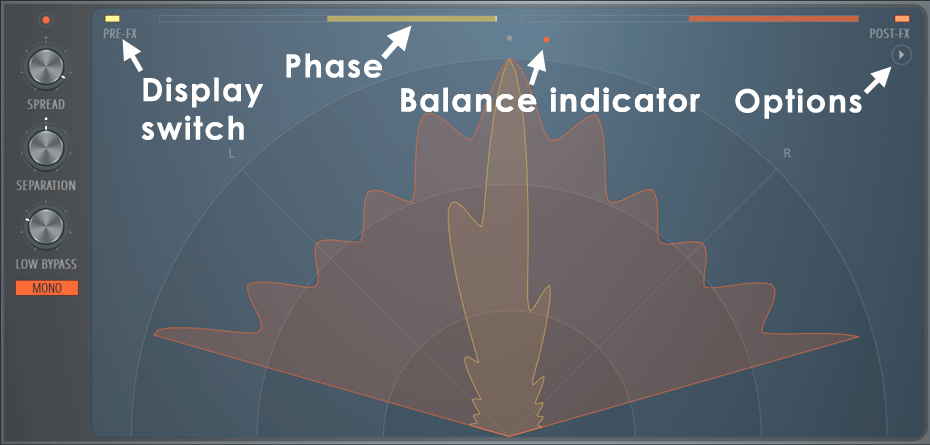
The Mixer provides a polarity inversion control. Fruity Phase Scope can help analyse the stereo relationship, but does not directly compare a separate kick and bass as independent reference signals.
Once you understand what is happening, Fruity Stereo Shaper can also help. It lets you adjust aspects of the signal, including polarity and certain phase relationships.
Be careful with its delay controls: some are designed to introduce timing differences between the left and right channels, rather than shift both channels equally.
To time-align a complete bass signal, it is usually simpler to use the track's delay adjustment or move the audio directly.
As always, listen to the result within the mix.
Plugins for Analysing and Automatically Improving Phase
In recent years, dedicated tools have appeared for analysing the phase relationship between kick and bass.
They can make the process easier by displaying both signals and, in some cases, automatically adjusting their relationship.
Examples include ReVision and StereoGhost PhaseKicker.
They focus on visualising and adjusting the phase relationship between kick and bass, using approaches such as polarity inversion, timing offsets and phase processing, depending on the plugin.
ReVision 2 includes a feature called Phase Follow, designed to analyse both sounds during playback and adapt the alignment as the bass changes.
PhaseKicker is designed to optimise the phase relationship automatically for each detected kick hit.
The main advantage is saving time and gaining a visual understanding of what is happening.
However, automatically calculated alignment does not necessarily guarantee the best musical result.
Always compare the original and processed sound and decide which works better within your production.
How to Send the Kick to the Plugin's Sidechain
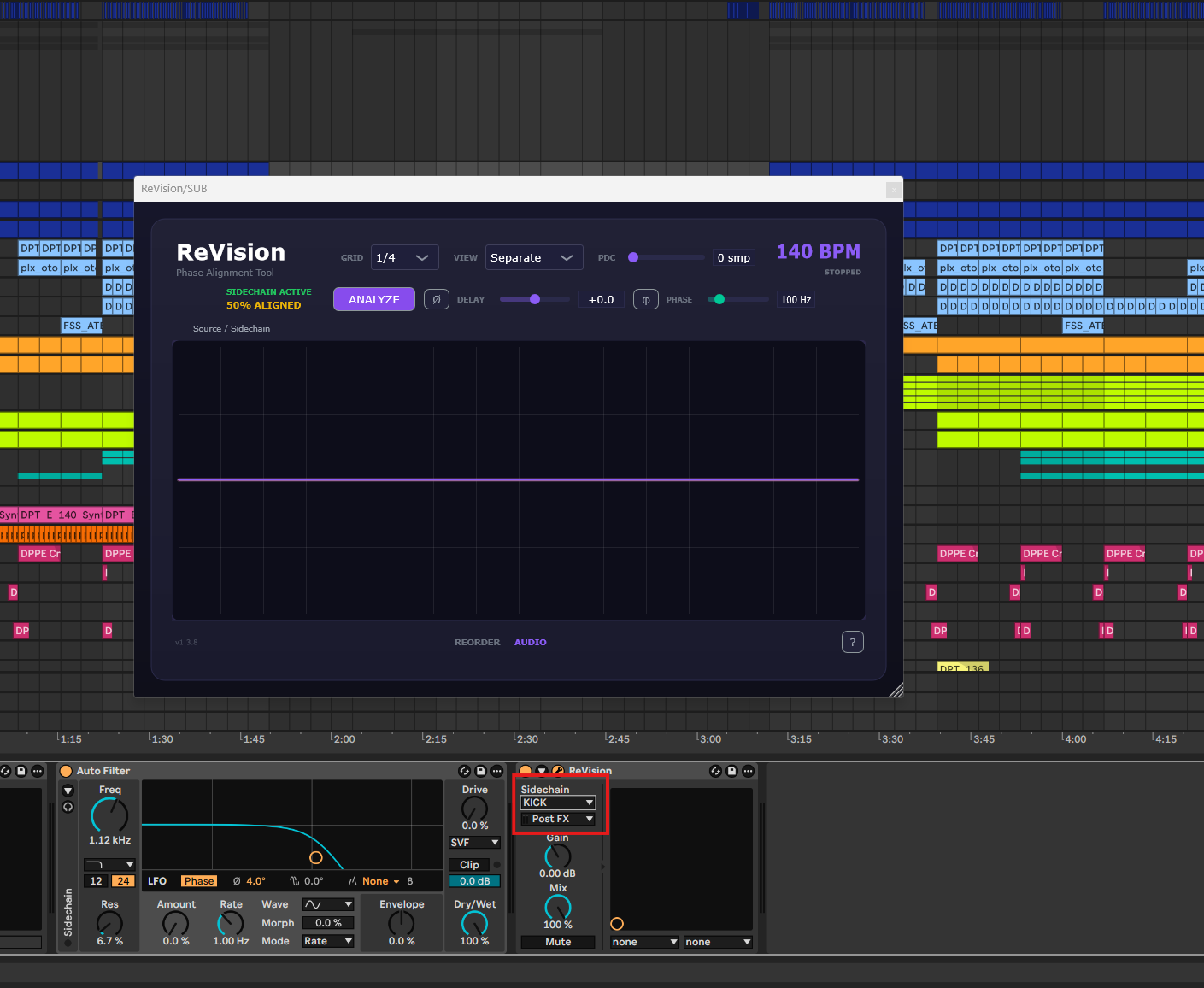
An automatic alignment plugin needs to receive both signals to compare the kick and bass correctly.
Normally, we insert the plugin on the bass channel.
The bass feeds the processor directly, while the kick arrives through an external sidechain input.
This allows the plugin to analyse both sounds without mixing them into the same audible channel.
This sidechain does not necessarily serve the same purpose as the sidechain compression used to create the familiar pumping effect.
Here, an external input allows the plugin to compare two signals.
Setup in Ableton Live
- Insert the alignment plugin on the bass channel.
- Open its sidechain settings.
- Select the kick track as the audio source.
- Check that the plugin receives both the bass signal and the kick reference.
- Play the track and use its analysis or alignment controls.
If the plugin offers automatic alignment, use it as a starting point and compare the result afterwards.
Setup in FL Studio
The procedure is slightly different in FL Studio.
- Insert the alignment plugin on the bass channel in the Mixer.
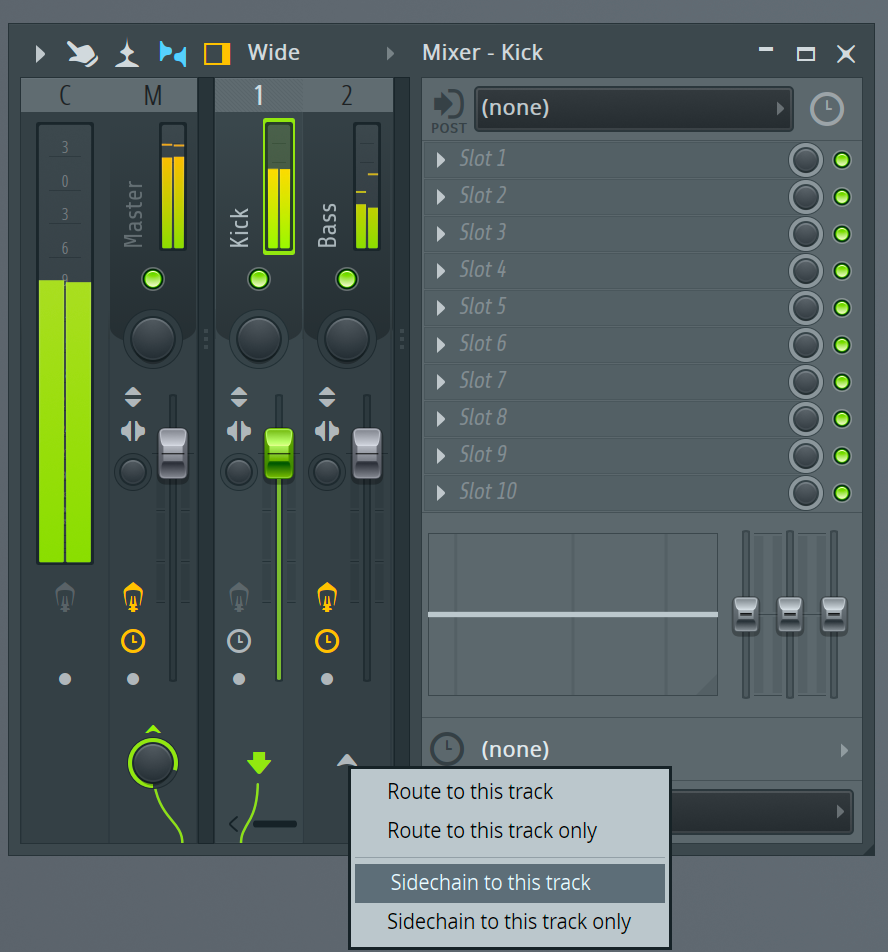
- Select the kick channel, right-click the routing arrow on the bass channel and choose Sidechain to this track.
- Open your automatic phase alignment plugin.
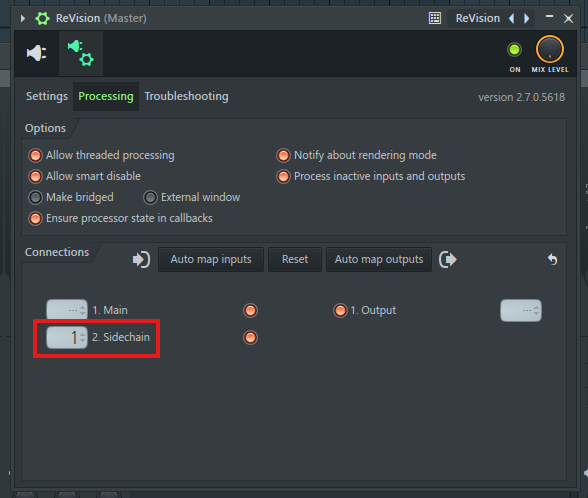
- Open the Fruity Wrapper settings and select Processing.
- Under Connections, map the plugin's Sidechain input to the incoming kick sidechain.
- Play the track and start analysing the phase relationship.
Once configured correctly, the plugin can compare the bass with the kick reference signal.
Make sure the send does not create a second audible copy of the kick inside the bass channel.
Should We Always Aim for Perfect Alignment?
This is probably the most important question in the entire article.
My answer is no.
We do not need the kick and bass to be perfectly aligned at every moment.
First, the two sounds may contain different frequencies.
Second, the bass notes change, and their phase relationship with the kick can change too.
Third, the technically optimal solution is not always the best musical decision.
A tool might show an apparently improved phase relationship, yet the result may have lost some of the character we liked.
My recommendation is to use these tools as support.
If there is an obvious low-end problem, investigating significant cancellation is worthwhile.
But if the kick and bass already work well together, there is no need to change their phase simply because an analyser shows something that does not look ideal.
Do not fix problems that do not actually exist.
Conclusion: Less Technical Obsession, More Trust in Your Ears
For years, I produced music without paying much attention to the phase relationship between kick and bass.
I simply listened, selected sounds and adjusted them until I achieved the result I wanted.
Although I now consider understanding phase important, I still believe sound selection and our ability to listen are fundamental.
Today's technology lets us analyse things that were previously difficult to identify.
We can view waveforms, make timing adjustments of just a few samples and use plugins that automatically optimise the relationship between different signals.
This is fantastic, especially when it helps us work faster and more efficiently.
But it should not become an obsession.
Learn the fundamentals, understand the available tools and use them when you actually need them.
Our goal as producers is not to create two visually perfect waveforms.
Our goal is a powerful, balanced kick and bass that work together within the music we are making.